


2.9 Building Entry, Access and Security
An NACD IPGUARD door entry system has been installed to the front entrance of the development to provide a secure means of access. This system works through both your landline and your mobile phone and uses an electronic proximity fob to enable you to gain access to, and then move around the development.
In order to use the system you must first register with NACD. Details on how to do so can be found by clicking here.
Once you have registered, the instructions below explain how the system works:
You can also view the full user guide by clicking here.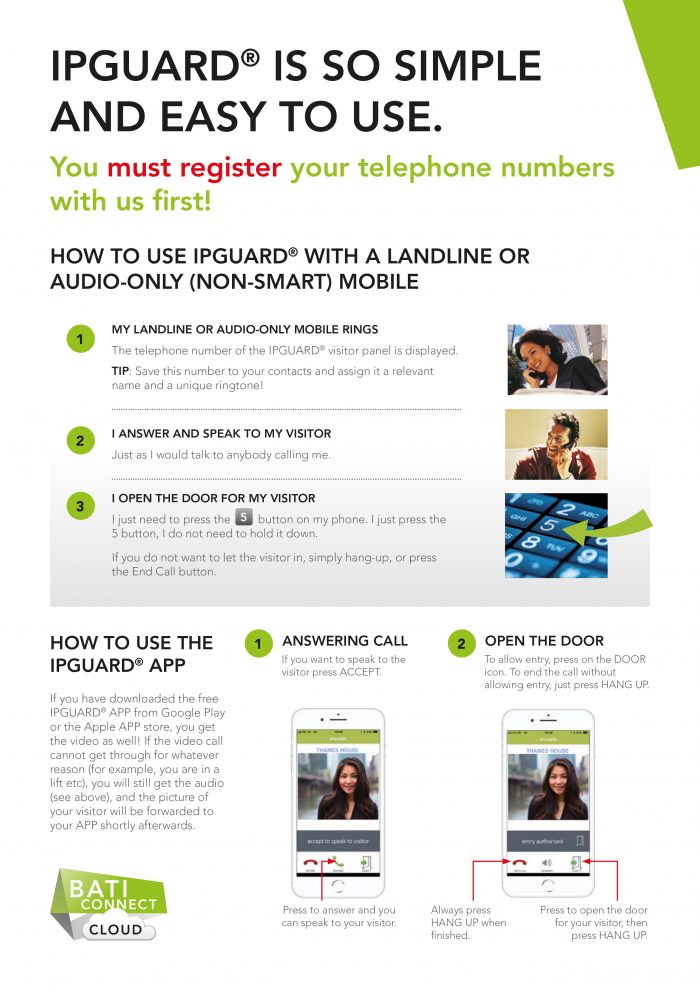
You can programme your television to show a video of who is at the main entrance door. To set this system up and use it please follow the instructions below:
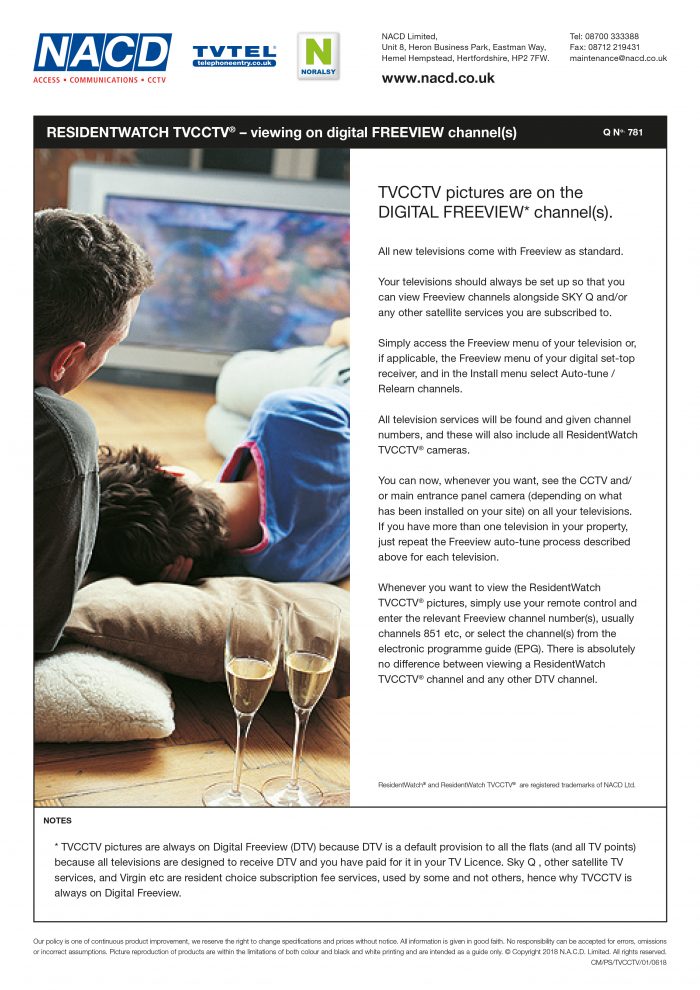
The front entrance of the building is fitted with a door entry panel complete with fob reader.
When a resident presents their fob to the reader on the panel the system will release the lock to the external door. This will permit the resident entry into the internal lobby.
There is a second access control door between this area and the rest of the development to provide additional security and to prevent people tail-gating residents into the building.
The first external door will disengage for approximately 10 seconds and the second inner door will disengage for approximately 15 seconds. Please note if you remain in the lobby area for too long (for example collecting your post) the second inner door will re-lock and you will need to present your fob again to the second reader by the lobby door. When this reader is fobbed, it will only release the lock on that door.
In the interests of security please do not wedge the entrance doors open. Always ensure that the doors are closed securely behind you – please check that the door is fully returned and is locked. If you are in doubt please push the door to ensure it is fully closed.
IF YOU HAVE FORGOTTEN YOUR FOB
As an additional default mechanism, if you have forgotten your proximity fob and want to gain access to any areas within the development then you can scroll up to/dial A0777 on the entry panel and this will then connect you to the Managing Agents: Houston Lawrence. If they are satisfied with the authenticity of the call then they can allow access remotely. We strongly recommend that this information is not shared with visitors and is only used in the case of an emergency. This will help to ensure the integrity of the building’s security arrangements are maintained.

ENTRY FOR VISITORS
When a visitor arrives at the building they can use the keypad on the access panel to either type in the number of the apartment or use the search function to locate the apartment number. Then press the CALL button.
The NACD system will dial the telephone of the resident they are visiting. The resident will be able to speak with the visitor via the telephone. The resident can then buzz the visitor in via their telephone and give the visitor access.
When the visitor is given access the lock on the front door and internal door will both be released for a short period of time (approximately 10 seconds for external door and 15 seconds for internal door). This will permit the visitor enough time to walk through the external door and continue on through the lobby providing that they do no delay entry in through the second door. If the visitor does not walk directly through the internal door then the lock will lock once the time has lapsed. To gain access through the second door the visitor will then be required to exit the building back to the front door and call up to the resident for entry again.
LEAVING THE BUILDING
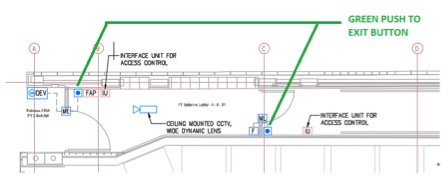
When leaving the building there is a green push to exit button fitted on the secure side of both the internal and external doors. When these buttons are pressed, the lock will disengage and the door will release to open. There are self -closers on these doors to return them to the closed position, where the magnetic locks will re-engage.
BIN AND BIKE STORES
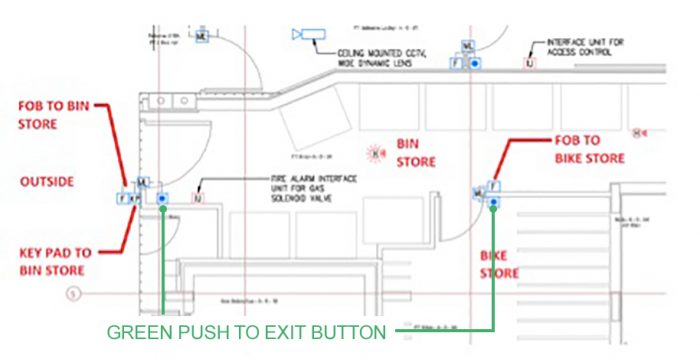
The bin and bike stores also have access controlled doors. There is a fob reader on the entrance to both of these areas which controls access.
The bin store is fitted with a fob reader for use by the residents and a digi-lock key pad for use by the bin men. The bike store is only fitted with a fob reader. If the entrance door to the bin store is opened by the bin men, this doesn’t automatically trigger the opening of the bike store door, so the bike store always remains secure. Green push to exit buttons are fitted on the secure side of each door to permit the residents to leave without using their fobs. There are self-closers on these doors to return them to the closed position, where the magnetic locks will re-engage.
ACCESS TO THE REAR GARDEN
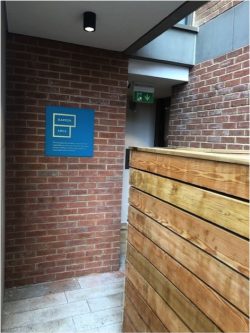
The door at the lower ground floor that provides access to the communal gardens is also fitted with a push to exit button on the internal side of the door and a door entry panel complete with fob reader on the outside. When a resident wishes to re-enter the building from the garden, present the fob to the reader on the access panel and the system will release the lock to the external door allowing entry.
In the event of a visitor or a resident going to the garden without a key fob they can use the panel fitted on the garden entrance door to call the apartment they are visiting. As with the main front entrance door, the resident can then provide access via their telephone. This is to ensure that no one gets trapped in the garden area in the event of not having a fob to enter.
When the visitor or resident is given access the lock on the garden door will be released for a short period of time (approximately 5 seconds).

ENTRY FOR THE POSTMAN
The postman will receive a fob to gain entry into the building. The fob only allows for the release of the lock to the front door to grant access to the inner lobby, where the post boxes are located. The second internal lobby door will remain locked. This will allow the postman into the internal lobby to deliver post but prevent access to the rest of the development. There is a parcel shelf at the bottom of the post boxes where larger items can be left.
FIRE SAFETY FEATURES
The access control system is linked with the fire detection system within the communal areas of the building. In the event of a fire being detected the access control system will immediately open and all locks will disengage. All locks are powered closed fail open. In the event of a power failure in the building all locks will fail open. It is important not to let anyone tamper with the fire alarm break glass panels, as if they trigger the detection system all of the locks will disengage and the building will be unsecure.
YOUR FRONT DOOR
The front door of your apartment has a PAS 24 door lock fitted to it that has a 3-point lock located in the edge of the door that activates when the door is locked with the key from the outside. You can get additional keys cut at any locksmiths. On the inside of the door is a thumb turn which will also activate this lock should you wish to secure the door when you are inside your apartment. A spy hole is installed in door and we would recommend that this is used if your door bell is rung unexpectedly.
CCTV
There are a number of CCTV cameras located in and around the building that will monitor the various entrances and courtyard area. These CCTV cameras are intended to act as a deterrent but will be regularly reviewed and if any criminal damage or activities are recorded then the Landlord and Managing Agent reserve the right to commence legal proceedings against any offenders.