


2.3.2 Underfloor Heating
An underfloor heating system comprises a series of pipes laid in evenly spaced loops that are in a screed below the floor finish through which heated water passes and transfers heat into the room. Unlike conventional radiator systems that need to heat air, the time for the underfloor heating to take effect and heat the room is longer as it first must heat the floor screed and floor finish. Likewise, when the heating is turned off it takes longer for the heat in the room to cool down. As the underfloor heating pipework is laid in loops and does not run to the edge of rooms there will not be 100% warm coverage of the actual floors themselves and there will be cooler areas of floor where there are no pipes laid directly below it, but the room as a whole should have a relatively consistent temperature.
Underfloor heating can be described as a “slow burning system” which operates at much more regulated, constant temperature ranges and works best when it is only asked to deliver minor fluctuations in temperature from an already warm starting point. It will not be able to deliver large and instantaneous temperature changes to rooms like conventional radiator systems.
For these reasons it is important to set the time and temperature controls for the underfloor heating systems consistently and to the recommended temperatures that the system is designed to achieve. If room thermostats are set too high, then they will prevent the underfloor heating from operating effectively as the heating will try to heat a room to the temperature selected and this may prevent adequate flow of water for heating to other zones/rooms.
By controlling the temperature within the different heating zones you will have better control over the overall heating in your apartment. We would recommend that where there are rooms that are used infrequently or not used at all that you either turn down the heating or switch it off to improve the energy efficiency of your home and to keep your energy bills down.
During the summer months and given the high level of insulation built into your apartment, it should not be necessary to have the underfloor heating on at all and so again during this period we would suggest that it is turned down to a very low setting or turned off. During this period the electric towel rails can still be used to dry towels and remove moisture from the bathrooms and en-suites, as they are controlled separately.
To get the best from the heating system, set the room thermostats to between 20–22C and allow time for the system to achieve the preferred temperature.
Turning the temperature on the room thermostats too high will not necessarily heat the rooms up any quicker. In fact, it might take longer to heat the room to the desired temperature as the system will be operating outside the range for which it has been designed. When the room reaches the required temperature the heating will automatically go off and the thermostat will then re-engage when the room cools below the required temperature.
If your heating is left off for long periods of time e.g. following a holiday then it will take a long time for the rooms to heat up and allowances should be made for this. As referred to previously please do not expect it to warm up quicker if you set all of the room thermostats to their highest setting but rather be patient and let it perform as it has been designed to and let it warm up over a longer period of time.
The underfloor heating manifolds are located behind a fixed panel in the cupboard in the hallway.
Manifolds are a key part of your underfloor heating system. They connect the underfloor heating pipework to the heat source and act as the termination point for these circuits. Manifolds are responsible for circulating heated water the underfloor circuits whilst controlling the pressure, flow-rates and temperature.
The manifolds and associated electrical components are efficiently controlled by the wiring centre. This forges a connection between the actuators, circulators and zone valves with the thermostat and heat source. When a thermostat calls for heat in a specific heated zone, the wiring centre will supply voltage to the relevant actuator (or multiple, if using more than one circuit per heated zone) which opens the commissioning valves and allows warm water to flow through the circuits. The wiring centre also simultaneously calls for more heat, opens any manifold zone valves and operates the mixing unit circulator.
The manifolds have been set up, balanced and commissioned.
Please do not remove the cover or adjust any of the manifolds.
The Heat Manifold Cover and Conceleaded Pipework behind


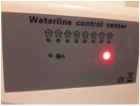
The wiring centre for the underfloor heating is located at low level in the hallway cupboard. The solid red light indicates that there is a power supply. A green LED will illuminate under the “house” symbol when one or more of the room thermostats calls for hot water and the manifold opens to provide underfloor heating to that area.
The wiring centre for the underfloor heating
Your underfloor heating system has separately controlled zones depending on the apartment:
- Entrance hallway and bathroom
- Kitchen / living / dining
- Master bedroom / en suite
- Bedroom 2 / Bedroom 3
Underfloor Heating Controls

Each of these zones can be individually controlled so that you can have your heating coming on at different times and set different temperatures in each zone.
Choose the times your heating comes on and off using the Honeywell ST9400 electronic programmer located in the hallway cupboard with the heat interface unit. The programmer lets you choose settings for each day of the week to match your lifestyle, while maximising energy savings, or alter them to your personal settings.
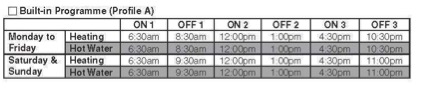
On the day you move into your apartment, the Honeywell programmer operation mode will be set to Profile A. This programme can be kept or can be used as a starting point that you can then personalise to your own requirements.
Profile A
TURNING THE HEATING OFF
If you wish to turn you heating off altogether for example in the summer months, you can do so using the HEATING OPERATING MODE button on the Honeywell programmer.
There is also a HOLIDAY function button which allows you to switch off your heating and hot water for a specified number of days (from 1–99 days). This lets you save energy and related costs when you are away from home, but resumes normal operation on the day of your return.
To adjust the programmer follow the instructions set out in the Honeywell user manual which you can view here.
The Honeywell programmer is mains powered with lifetime battery-back up, which means you should never need to change it. The built-in memory holds your programme indefinitely – even if the mains power fails.
You can control the temperature throughout the apartment by using the Heatmiser DS1-L wall mounted room thermostats located within each zone.
By increasing the desired room temperature at the thermostat a signal will be sent to the wiring centre which in turn will cause the actuator to open its associated valve and allow low temperature hot water (LTHW) to enter the flooring circuit – this will heat up the flooring mass and warm up the room by radiating the heat across the surface of the floor.
SETTING THE TEMPERATURE
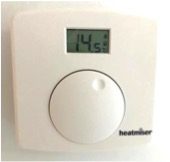
In normal mode, the display shows the actual room temperature. To change the set point, rotate the dial until the digital LCD display panels shows the new set temperature.
The Heatmiser DS1-L has a lock facility which if turned on will prevent the temperature being adjusted.
- To lock the thermostat, press and hold down the dial for 10 seconds until the KEYPAD LOCKED symbol appears.
- When in locked mode the temperature dial will rotate but the temperature will not be adjusted.
- If you wish to adjust the temperature, hold down the dial again for 10 seconds until the KEYPAD LOCKED symbol has cleared from the LCD display.
Heatmiser DS1-L

The DS1-L Thermostat Manual can be viewed by clicking here.
Important: The Honeywell programmer over-rides the individual room thermostats. The room thermostats won’t respond if the Honeywell programmer isn’t set for the heating to be on at that time. It is best to use the Honeywell programmer to select your preferred settings for the heating and then adjust the temperature using the individual room thermostats.